Why my notes and my website live in two separate repos
One private vault for everything I think, one site for what I choose to share, and a small script as the only bridge between them.
I wanted one place to write everything: notes from meetings, reading notes, half-formed ideas, and the essays that end up here. I also wanted to be certain that nothing private could reach the public site by accident. Those two goals pull in opposite directions, so the design keeps them apart on purpose.
Two repositories, one bridge
My notes live in a private vault, a folder of Markdown files I edit in Obsidian and keep in a private git repository. This website is a second repository. The only thing that moves content from one to the other is a short Python script.
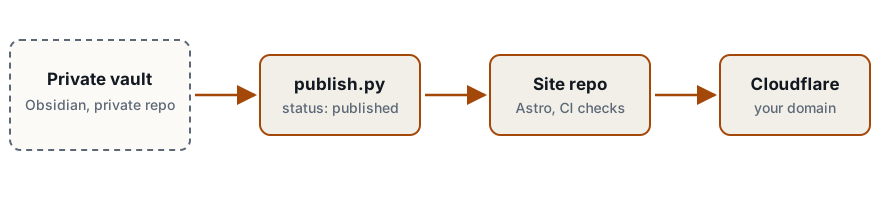
The vault repository is never connected to the hosting provider. If the build server never receives a file, it cannot leak it.
The rule for leaving the vault
Every note has a status: private, draft, review, published or archived. Only published crosses the boundary, and only from the public/ or drafts/ folder. A missing or misspelled status means private. The script does not open the private/ folder at all, so even a mistaken status there has no effect.
More checks sit behind that rule:
- A link from a published essay to an unpublished note stops the publish, because rendering it would reveal the private note’s title.
- The publisher scans every piece for email addresses, phone numbers, API keys and file paths before writing anything.
- The site’s build refuses any content file whose status is not
published. - A check on my laptop compares the published files against my private notes before each push, and fails if a private note was copied in by hand.
Why not a CMS with private pages
Most content systems can mark a page as private. That works until a setting changes, a plugin misbehaves, or a URL is guessed. Keeping private material off the server removes that whole class of mistakes, and the cost is one command before I publish.
What I get
Everything is plain Markdown in git, so I can move hosts, change tools, or point a language model at my own notes without an export step. Writing starts in the same place as thinking, and publishing is a status change, not a copy-paste.